

GitHub
Connected automatically during setup. No additional configuration needed.Slack
The primary way most teams interact with Macroscope. DM Macroscope or tag@Macroscope in any channel to query the agent.
Macroscope also streams real-time code activity into Slack channels via /macroscope commands. Use /macroscope subscriptions to view a channel’s subscriptions, or /macroscope help for the full command list.
Slack Subscription Commands
Slack Subscription Commands
/macroscope subscribe <repo>: all activity from a repo/macroscope subscribe-commits <repo>: commit summaries (includes linked Jira and Linear tickets)/macroscope subscribe-prs <repo>: PR activity, with live emoji reactions as PRs are ✅ approved, 💬 commented, or 🚀 merged/macroscope subscribe-build-failures <repo>: build failures
A Slack admin can connect Slack in Settings → Connections → Slack.
Linear
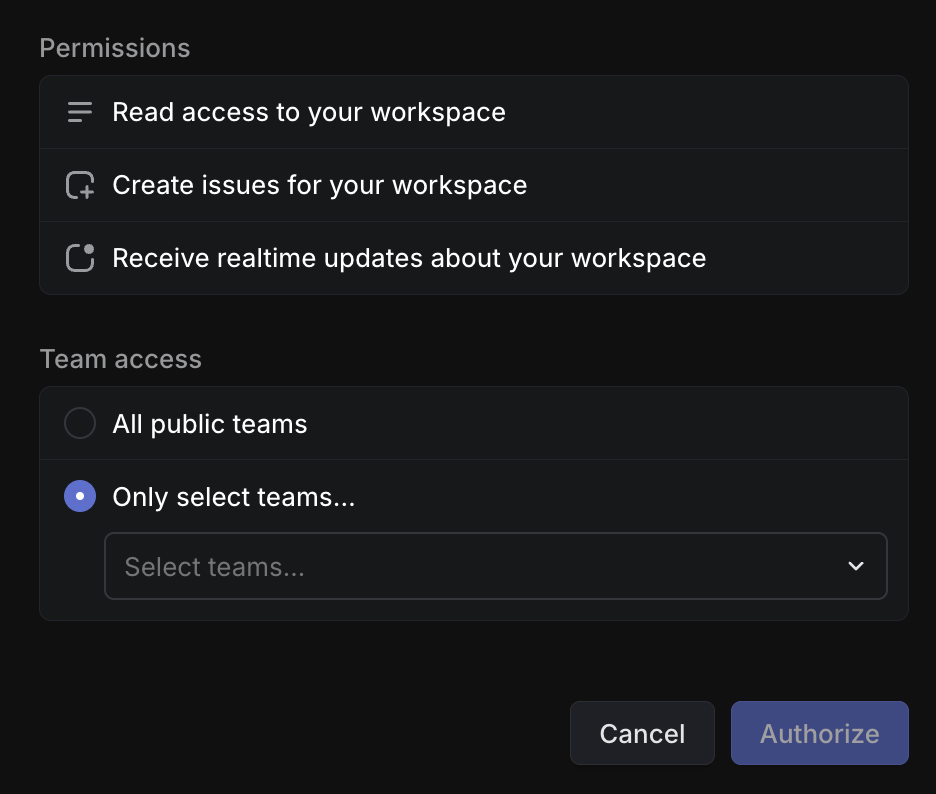
The agent can look up issues, track project progress, and create new issues. When you connect Linear, you choose which teams Macroscope can access.Linear Setup Instructions
Linear Setup Instructions
Jira
The agent can look up tickets, track project progress, and create new issues. Macroscope inherits the permissions of the Jira account that authorizes the integration.Jira Setup Instructions
Jira Setup Instructions
Sign in to Jira
Make sure you are logged out of any personal Jira accounts first. Click Connect Jira and sign in with the account you want to authorize for Macroscope.
In some cases, a Jira site admin may need to manually authorize the connection:
- Go to Atlassian Administration → Apps → [your-site].atlassian.net → Connected apps
- Find Macroscope and click Authorize/Allow for the site.
LaunchDarkly
The agent can list feature flags, projects, and environments, and check flag status and targeting rules.LaunchDarkly Setup Instructions
LaunchDarkly Setup Instructions
PostHog
The agent can query product analytics events, analyze trends, and inspect feature flags.PostHog Setup Instructions
PostHog Setup Instructions
Sentry (beta)
The agent can search error issues across projects, view issue details and event history, and investigate crashes and exceptions.Sentry Setup Instructions
Sentry Setup Instructions
Select Your Instance
Choose your Sentry region: sentry.io, us.sentry.io, de.sentry.io, or enter a custom URL for self-hosted instances.
Generate an Auth Token
In Sentry, go to Settings → Auth Tokens and create a token with the following scopes:
event:read, project:read, org:read.BigQuery
The agent can browse datasets, inspect table schemas, and run read-only SQL queries. Answers include a methodology summary so you can verify the analysis.BigQuery Setup Instructions
BigQuery Setup Instructions
Create a GCP Service Account
In Google Cloud Console, create a service account with BigQuery Data Viewer and BigQuery Job User roles. Generate a JSON key file.
GCP Cloud Logging
The agent can search and filter application logs across connected GCP projects.GCP Cloud Logging Setup Instructions
GCP Cloud Logging Setup Instructions
Create a GCP Service Account
In Google Cloud Console, create a service account with Logs Viewer role. Generate a JSON key file.
Amplitude (beta)
The agent can run event segmentation queries, analyze conversion funnels and retention, and inspect individual user event streams.Amplitude Setup Instructions
Amplitude Setup Instructions
MCP Connectors (beta)
Connect any MCP-compatible server to extend the agent with custom tools (e.g. Datadog, PagerDuty, or your own internal APIs). Admin only.MCP Setup Instructions
MCP Setup Instructions
Enter Server URL
Paste the MCP server URL and click Discover. Macroscope will auto-detect the server’s authentication method.
Configure Authentication
Depending on the server, you may need to provide OAuth credentials (Client ID and Secret), custom headers, or no authentication.